Logii Browser Review 2025: Is This Anti-Detect Browser Worth It for Multi-Account Marketing?
If you manage multiple ad accounts, social media profiles, or e-commerce storefronts, you know the pain of account bans. Platforms like Facebook, Google, and Amazon use browser fingerprinting to link accounts, and one misstep can take down your entire operation. Logii Browser positions itself as an affordable anti-detect browser designed specifically for digital marketers who need to run multiple accounts without triggering bans. In this review, we'll break down its features, pricing, real-world use cases, and how it stacks up against competitors like AdsPower, Multilogin, and GoLogin.
What Is Logii Browser?
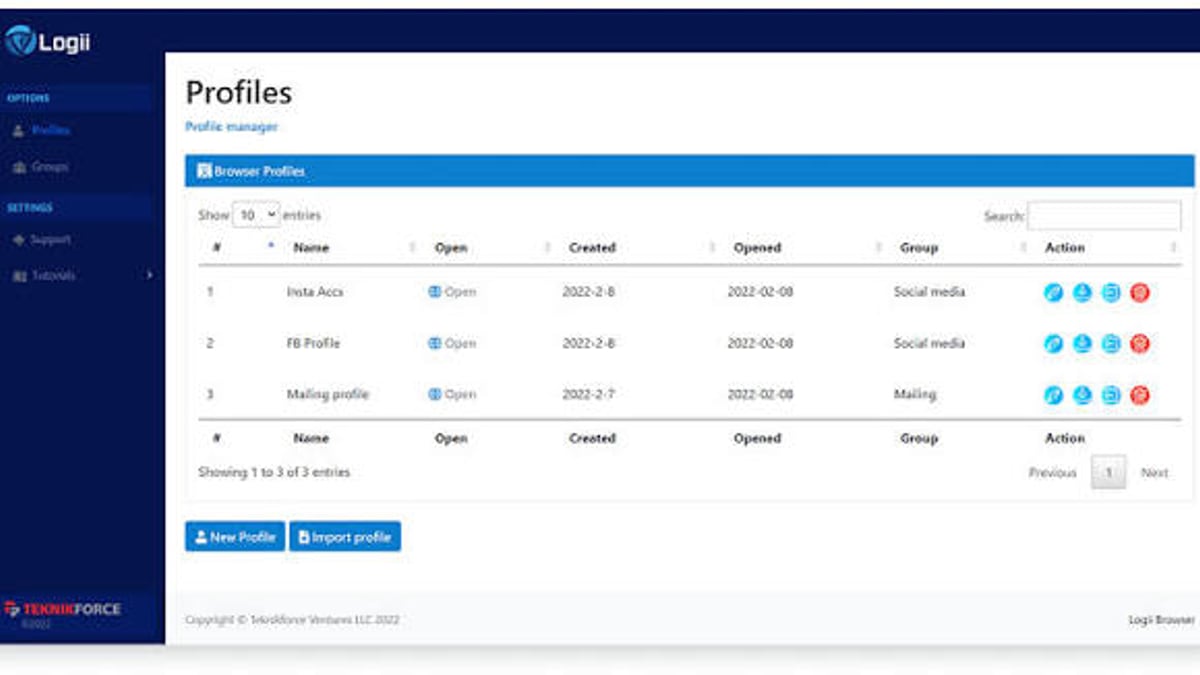
Logii Browser Review 2025: Anti-Detect Multi-Account Tool - feature overview.
Logii Browser is a Chromium-based anti-detect browser that creates isolated browsing environments for each of your accounts. It prevents websites from fingerprinting your device by spoofing hardware and software parameters—like screen resolution, user agent, WebGL data, and timezone—so each profile looks like it's coming from a completely different computer. The browser is marketed primarily to internet marketers, affiliate marketers, and agencies who need to run multiple ad accounts, social media profiles, or e-commerce stores from a single machine.
Key Features at a Glance
- Multi-Account Isolation: Each account runs in its own secure environment with separate cookies, local storage, and cache.
- Anti-Detect Fingerprinting: Spoofs over a dozen browser parameters including WebGL, audio, fonts, and indexedDB.
- Proxy Integration: Assign a unique proxy (HTTP, SOCKS5, or SSH) to each profile for IP diversity.
- Account Sharing: Share profiles with team members without exposing passwords or OTPs.
- Geo-Location Control: Set a custom location for each profile to match your proxy region.
- Low Resource Usage: Designed to run up to 10 profiles simultaneously without significant memory or bandwidth drain.
- Extension Support: Install Chrome extensions for additional functionality.
Logii Browser Pricing: How Affordable Is It?
Logii Browser Review 2025: Anti-Detect Multi-Account Tool - workflow example.
One of Logii's strongest selling points is its price. According to the official site, Logii Browser offers a single license with 10 profiles for a one-time fee that is 85% less than monthly subscriptions from competitors. Here's a quick comparison based on publicly listed prices:
| Product | Monthly Price | Yearly Price | Profiles Included |
|---|---|---|---|
| AdsPower | $97 | $1,164 | 100 profiles |
| Multilogin | $99 | $1,188 | 100 profiles |
| GoLogin | $99 | $1,188 | 100 profiles |
| Logii Browser | One-time (85% less) | One-time (85% less) | 10 profiles |
Note: Logii's pricing page shows a special sale with an 85% discount and a free version for Windows. Always check the official site for current offers.
For marketers who only need a handful of profiles, Logii's one-time payment model can be significantly cheaper than paying monthly for a tool like Multilogin or GoLogin. However, if you need hundreds of profiles, the per-profile cost may favor competitors with higher-tier plans.
Logii Browser vs. Competitors: Which One Should You Choose?
Choosing the right anti-detect browser depends on your scale, budget, and technical needs. Here's how Logii compares to the top alternatives:
Logii Browser vs. Multilogin
- Pricing: Logii is drastically cheaper for small setups. Multilogin starts at $99/month for 100 profiles.
- Features: Both offer robust fingerprint spoofing, but Multilogin has a more mature proxy management system and team collaboration features.
- Best For: Logii is ideal for solo marketers or small teams on a tight budget. Multilogin suits agencies needing advanced team workflows.
Logii Browser vs. GoLogin
- Pricing: GoLogin's Orbita plan is $99/month. Logii's one-time fee is lower for 10 profiles.
- Features: GoLogin offers cloud-based profiles and a mobile app, which Logii lacks. Logii focuses on desktop-only usage.
- Best For: GoLogin is better for users who need remote access or mobile emulation. Logii works well for local, single-machine setups.
Logii Browser vs. AdsPower
- Pricing: AdsPower charges $97/month. Logii's one-time fee is more economical for small profile counts.
- Features: AdsPower includes RPA (robotic process automation) and cookie synchronization, which Logii doesn't offer.
- Best For: AdsPower is suited for users who need automation. Logii is a simpler, manual multi-account tool.
Verdict: If you need 10 or fewer profiles and want to avoid monthly subscriptions, Logii is a compelling choice. For larger operations or advanced automation, consider Multilogin, GoLogin, or AdsPower.
Practical Use Cases for Logii Browser
Logii Browser shines in scenarios where you need to manage multiple identities without detection. Here are five common use cases:
1. Running Multiple Ad Accounts
Marketers often need several ad accounts to test different audiences or run campaigns for clients. Logii lets you create a separate profile for each account, each with its own proxy and fingerprint. This prevents ad platforms from linking your accounts and issuing bans.
2. Social Media Management
Agencies managing multiple client profiles on Facebook, Instagram, or LinkedIn can use Logii to log into each account from an isolated environment. You can schedule posts, engage with followers, and run ads without cross-contamination.
3. E-Commerce Store Management
Sellers on Amazon, eBay, or Shopify may need multiple seller accounts for different product lines or regions. Logii's geo-location control and proxy support allow you to appear as if you're operating from different countries.
4. Affiliate Marketing
Affiliates can use Logii to manage multiple publisher accounts on networks like ClickBank or ShareASale. Each profile can target a different niche or geographic market without raising red flags.
5. Web Scraping and Market Research
Logii's fingerprint spoofing makes it useful for scraping data from sites that block repeated requests. You can rotate profiles and proxies to gather pricing, reviews, or ad intelligence without getting blocked.
How to Set Up Logii Browser for Multi-Account Marketing
Getting started with Logii is straightforward. Follow these steps:
- Download and Install: Get the Windows version from the official Logii website. A free version is available for testing.
- Create a Profile: Click "New Profile" and give it a name. You can set the user agent, resolution, timezone, and language manually or let Logii generate random values.
- Assign a Proxy: Under proxy settings, enter your proxy details (HTTP, SOCKS5, or SSH). This ensures each profile has a unique IP address.
- Launch and Verify: Open the profile and visit a site like
whatsmyip.orgorbrowserleaks.comto confirm your fingerprint and IP are unique. - Add Accounts: Log into your ad account, social media profile, or e-commerce store within that profile. Repeat for each account.
- Share with Team: Use the account sharing feature to grant access to team members without sharing passwords.
Pro Tip: Always test a new profile on a low-stakes account first to ensure the fingerprint is clean before using it for critical campaigns.
Related reading
- Ghost Browser Review 2025: Features, Pricing & Use Cases - Explore Ghost Browser: a productivity browser for multi-account management, proxy support, and team sync. Review features, pricing, and practical use cases in 2025.
- Accovod Antidetect Browser Review 2025: Features & Pricing - Explore Accovod antidetect browser for managing multiple accounts. Review features, pricing, pros/cons, and how it compares to alternatives in 2025.
- Octo Browser Lite Review: Pricing, Features & Use Cases - Explore Octo Browser Lite: pricing, features, and practical use cases. See how this entry-level anti-detect browser plan fits your multi-accounting needs.
Sources and further reading
- Read more - Multi-login and multi-account browser for Internet marketers. Run multi-account online campaigns easily.
- Features - Multi-login and multi-account browser for Internet marketers. Run multi-account online campaigns easily.
Frequently Asked Questions
Is Logii Browser safe to use?
Logii Browser is designed for legitimate multi-account management. However, using it to violate platform terms of service (e.g., creating fake accounts) carries risks. Always comply with the terms of the platforms you use.
Does Logii Browser work on Mac or Linux?
Currently, Logii Browser is only available for Windows. There is no official Mac or Linux version.
Can I use Logii Browser for free?
Yes, Logii offers a free version with limited features. The paid version unlocks the full anti-detect suite and 10 profiles.
How many profiles can I run simultaneously?
Logii supports up to 10 profiles running at the same time. Performance may vary based on your computer's specs.
Does Logii Browser support extensions?
Yes, you can install Chrome extensions in Logii Browser, which adds flexibility for tools like ad blockers or SEO analyzers.
Conclusion: Is Logii Browser Right for You?
Logii Browser is a budget-friendly anti-detect browser that delivers on its core promise: allowing you to run multiple accounts from one computer without being detected. Its one-time pricing model is a standout for solo marketers and small agencies who need a handful of profiles. However, if you require hundreds of profiles, advanced automation, or cross-platform support, you may find better value in competitors like Multilogin or GoLogin.
For those just starting with multi-account marketing or looking to cut costs, Logii Browser is worth a try—especially with its free version. Pair it with reliable proxies and sound account management practices, and you can scale your campaigns without fear of bans.
Internal Links
- Learn how Ghost Browser compares for team-based multi-account workflows: Ghost Browser Review 2025: Features, Pricing & Use Cases
- Explore another anti-detect option: GoLogin Orbita Browser: Features, Setup & Use Cases
- For a deeper dive into multi-account management tools, see: Dolphin Anty Review 2025: Multi-Account Browser for Pros
External References
- Logii Browser official site: https://logii.in/
- Browser fingerprinting explained: https://browserleaks.com/
- Multi-account marketing best practices: https://www.searchenginejournal.com/
Disclaimer: Prices and features mentioned are based on publicly available information as of 2025. Always verify with the official source before making a purchase.